Microsoft Dynamics 365 Business CentralSage IntacctMicrosoft Dynamics 365 Business CentralQuickbooks Online
Xero

Make the Outlook Clear

Give leadership a cash flow report they can understand and use.

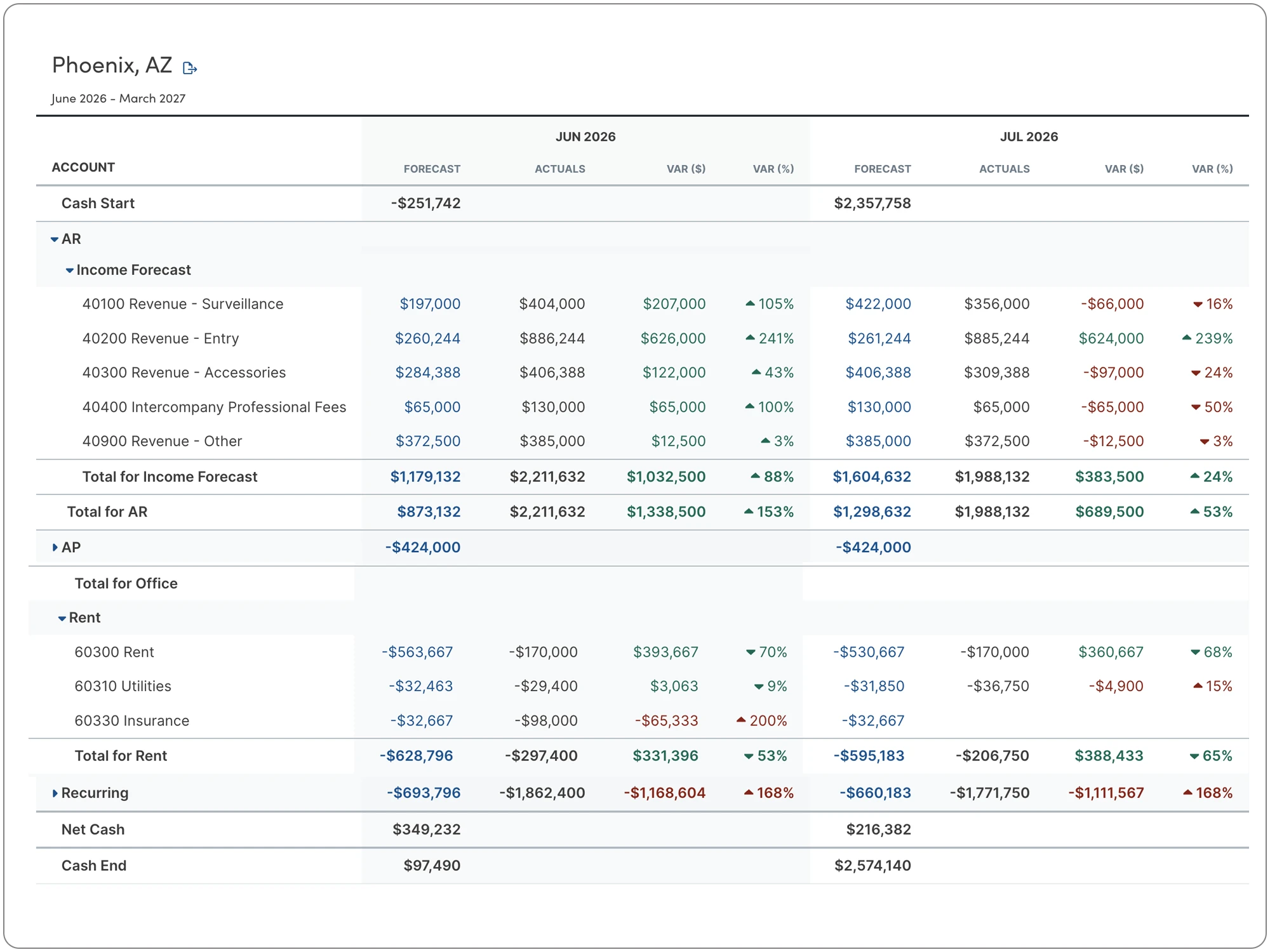
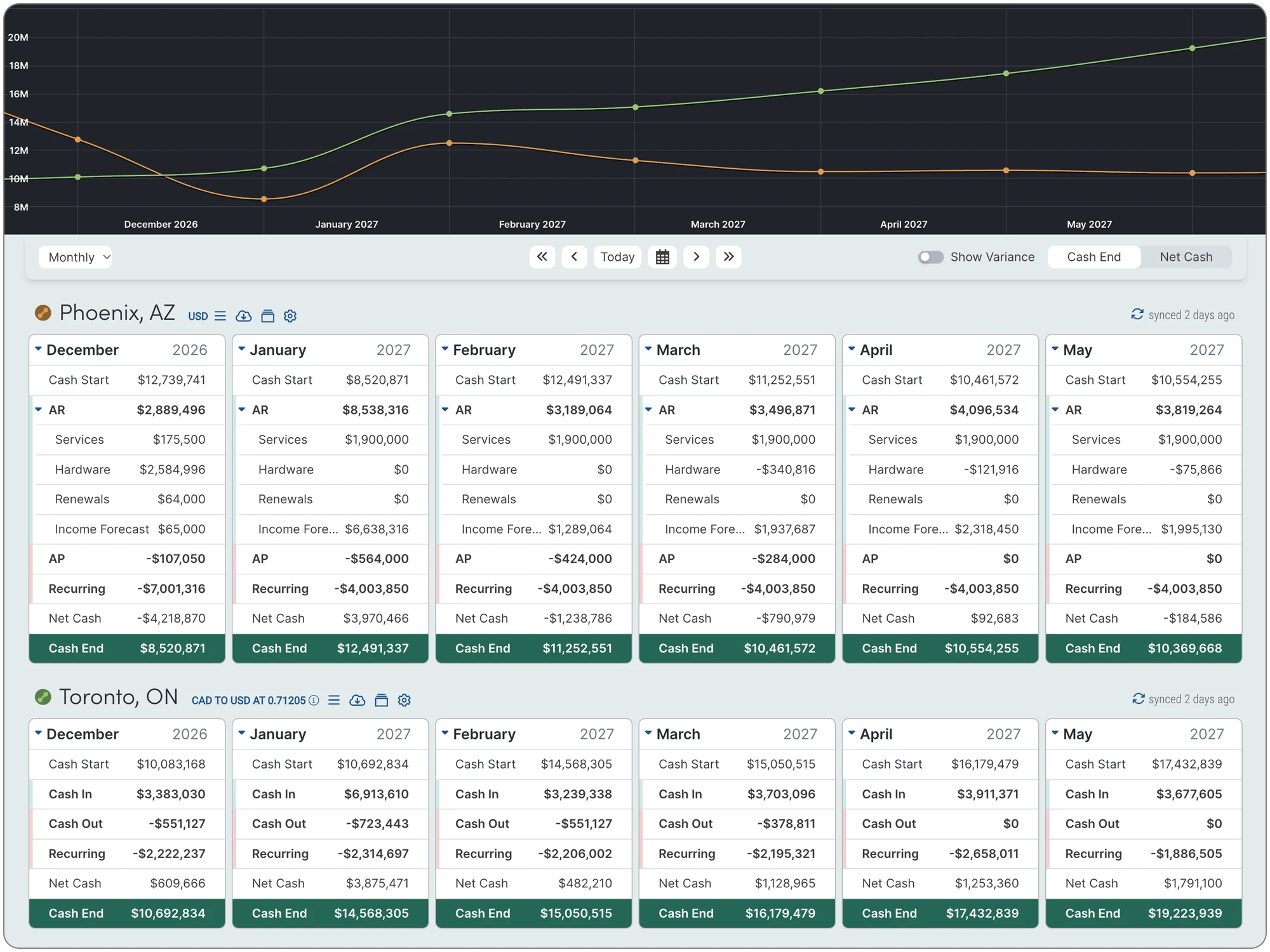
Dryrun helps CFOs and controllers present the financial outlook in familiar rows and columns, supported by clear visual forecasts. Spend less time reshaping spreadsheets and more time explaining what the numbers mean.

  • Choose the Right Timeframe: Review daily and weekly cash needs or present monthly, quarterly, and annual views. Match the report to the decision, from covering upcoming payments to evaluating longer-term plans.
  • Show the Detail That Matters: Collapse detailed items into broader summaries for management, then expand them when a question needs a closer look. Explain significant cash movements without overwhelming the discussion.
  • Share the Outlook: Export reports for colleagues and stakeholders who need to review the forecast. Give the CEO, board, owners, or lenders a clear basis for discussing funding needs, commitments, and next steps.
Cash Flow Scenarios
cash flow reporting

Understand What Changed

Compare your forecast with actual results and use the differences to improve your plans.

A forecast becomes more useful when you learn from it. Dryrun helps you review where results differed from expectations, investigate the reasons, and decide what needs to change in the outlook ahead.

  • Compare Plans With Results: Review actual performance against your forecast or budget. Identify where receipts, payments, or balances differed from the plan without building a separate comparison spreadsheet.
  • Investigate the Differences: Look into the accounts or entities behind a change. Determine whether it reflects payment timing, a different amount, or activity you had not anticipated.
  • Refine Your Expectations: Use what you learn to update future assumptions. Explain to leadership what happened, what it means for upcoming cash needs, and how your revised forecast accounts for it.

See What Needs Attention

Connect the cash outlook to the invoices and bills behind it.

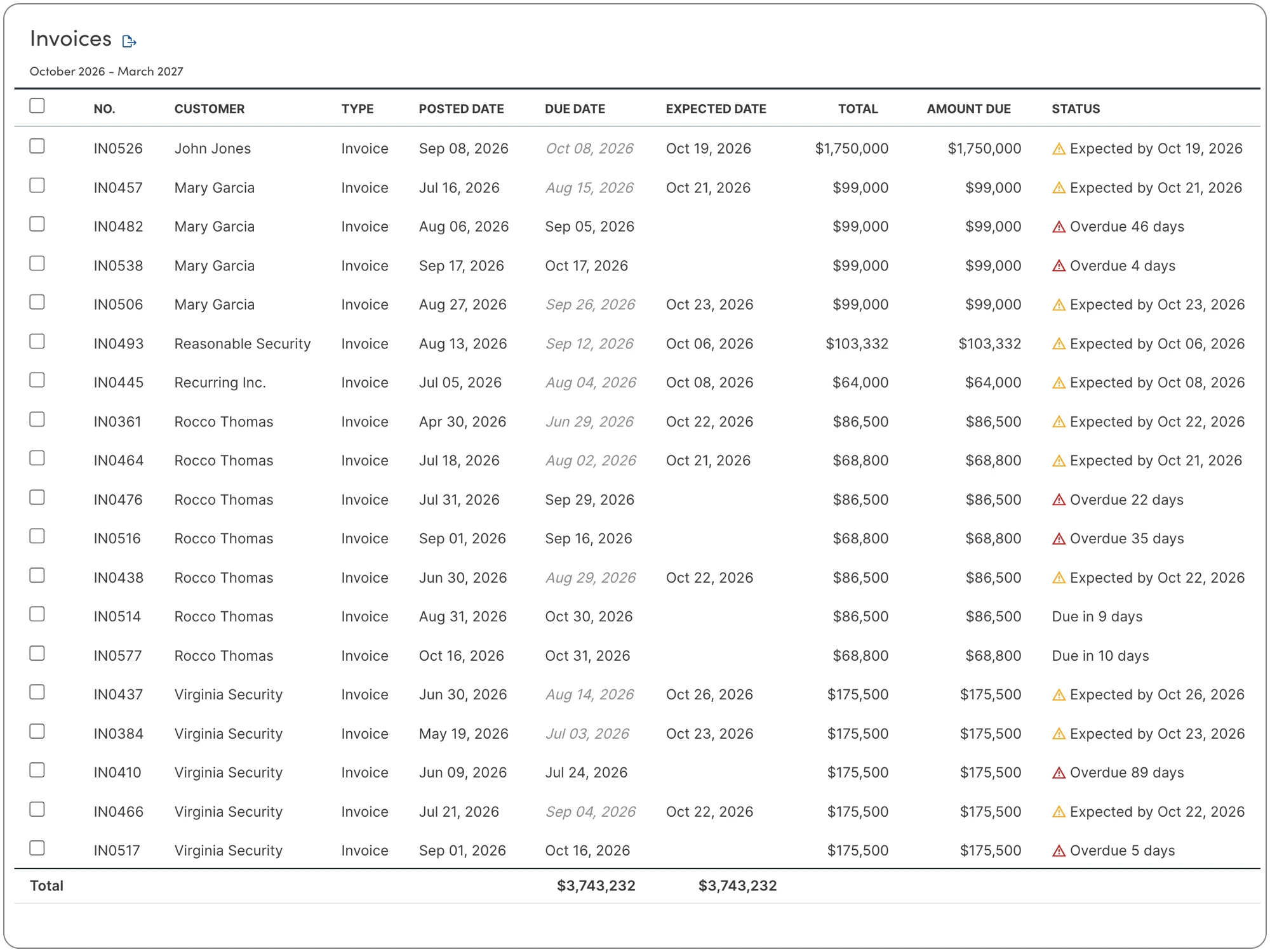
Outstanding receipts and payments help explain what may happen next. Dryrun brings receivables and payables into a working view so your team can review overdue amounts, investigate important items, and prioritize follow-up.

  • Review Outstanding Amounts: Bring open customer invoices and supplier bills into a consolidated view. Understand what is still to be collected or paid across the entities included in your forecast.
  • Understand What Is Overdue: Use aged receivables and payables reports to see how long amounts have been outstanding. Identify collections that need follow-up and obligations that deserve closer review.
  • Find the Relevant Details: Sort and filter by entity, customer, supplier, amount, or age. Focus on the items behind a cash concern and give your team a clear basis for deciding what to do next.
Invoice and Bill AR/AP List

Variance Analysis Software

Budget vs. Actuals Variance Features
Dryrun
Spreadsheets
Other Tools
Simple Budget Building at all Levels
Budget Consolidation
Manual
Few
Simple Mutli-Level Budget Roll-up
Collaborate on Budgets
Limited
Some
User Access Control
Limited
Compare Budget Scenarios
Some
Intuitive Interface
Rare
Customizable Categories
Manual
Automated Data Import
Most
Complete Manual Control
Real-Time Updates
Some
Historical Comparisons
Most
Reporting and Dashboard
Most
Drill-Down Analysis
Scalability for Multi-level Organizations
Some
Forecast Sensitivity Analysis
Few
Budget to Actuals Variance Analysis
Some
Budget to Actuals Down to the Account Level
Most
Dynamic Rolling Budget
Straight Forward Budget Allocation
Some
Drew English
Drew English
Charter & Co.
Not having cash flow on the back of my mind all day as a "what if" is really a big game changer. I'm done feeling the pain of cash flow.
Drew English
Drew English
Charter & Co.

See if Dryrun is a fit for you.

data graphic
Frequently Asked Questions

Find answers to common questions about billing, plan features, upgrades, and trial periods.

What is Dryrun and how does it assist in budget building?

Dryrun is a cash flow forecasting and dynamic budget-building platform purpose-built for mid-market finance teams looking to move beyond rigid P&L spreadsheets and static ERP add-ons. It combines smart ERP automation with total manual control, allowing finance leaders to establish real-time baseline budgets while layering on custom "what-if" operational scenarios across departments and business units.

By unifying hyper-granular operational expense tracking with long-term strategic budget modeling, Dryrun eliminates formula corruption and version-control chaos. Finance teams can build, test, and adjust rolling budgets based on real-world cash velocity and operational priorities without altering underlying general ledger records.

How does Dryrun facilitate budget roll-up?

Dryrun streamlines complex budget roll-ups by automatically aggregating departmental, project, and subsidiary budgets into a unified, consolidated corporate view. Designed to handle multi-entity structures and multi-currency operations, Dryrun eliminates the risk of broken cross-workbook links, formula offset errors, and multi-tab spreadsheet sprawl.

Equipped with dynamic variable zoom capabilities, Dryrun allows executive leadership to view rolled-up group performance or instantly drill down into line-item details for a specific department or cost center. This ensures full alignment between operational unit budgets and overarching corporate objectives, delivering a transparent, 100% auditable view of organizational cash health.

Can Dryrun support collaboration in budgeting processes?

Yes, Dryrun fosters cross-functional collaboration by replacing fragmented, emailed spreadsheets with a cloud-based single source of truth for financial planning. Built with enterprise role-based access control, Dryrun allows finance leaders, department heads, and operational managers to review budgets, contribute operational assumptions, and model shared scenarios according to their granted permissions.

By unifying cross-departmental inputs within a centralized platform, Dryrun bridges communication silos between finance, sales, and operations teams. During executive reviews and board meetings, stakeholders can collaborate on live, interactive dashboards together, testing dynamic assumptions and answering strategic budget questions in real time.

How does Dryrun help with variance analysis?

Dryrun simplifies variance analysis by continuously comparing automated live ERP actuals against historical budgets and baseline forecasts in real time. Rather than waiting for end-of-month accounting closes to spot discrepancies, finance teams can track budget vs. actual (BvA) performance across revenue, operational expenses, and cash movement as transactions occur.

With transaction-level visibility, Dryrun allows controllers and FP&A managers to pinpoint the exact operational drivers behind variances such as unexpected collection delays, vendor price shifts, or unbooked expenses down to individual bills and invoices. This immediate clarity enables leadership to make timely, data-backed adjustments to defend working capital and preserve margin.

Is Dryrun budget building software easy to use?

Yes, Dryrun offers fast time-to-value by combining the familiar flexibility and control of spreadsheets with the automated speed and visual clarity of modern web software. Built specifically for lean mid-market finance teams, Dryrun eliminates the steep learning curve, multi-month implementation timelines, and complex coding required by rigid enterprise FP&A systems.

To ensure a seamless transition off manual workbooks, Dryrun pairs new users with dedicated implementation specialists who assist with ERP API connections, multi-entity mapping, and custom model setup. Supported by an intuitive interface and responsive customer support, finance professionals can quickly build, maintain, and present boardroom-ready budgets with complete confidence.

Can Dryrun handle complex budget structures?

Dryrun is engineered specifically to manage complex mid-market budget structures across multi-entity corporate hierarchies, business units, departments, and project cost centers. Designed to replace fragile multi-tab spreadsheets and broken cross-workbook links, Dryrun allows finance teams to maintain detailed, granular budgets at the individual unit level while automatically consolidating data into an auditable corporate roll-up.

Equipped with variable zoom capabilities, Dryrun enables executive leadership to toggle seamlessly between high-level group overviews and line-item transactional details. This delivers complete transparency across complex organizational structures without risking formula corruption or version-control chaos.

How does Dryrun streamline the budget approval process?

Dryrun streamlines budget approvals by replacing fragmented, emailed spreadsheet versions with a cloud-based, centralized single source of truth. Built with enterprise role-based access control, Dryrun allows controllers and FP&A managers to grant specific permissions to department heads and executives, controlling who can view, edit, or submit budgets at each stage of the review cycle.

By providing interactive, boardroom-ready dashboards, Dryrun eliminates communication silos between finance, operations, and leadership. Executive stakeholders can review live projections, test shared assumptions, and answer dynamic "what-if" questions together, accelerating budget sign-off and strategic alignment.

Can Dryrun integrate with other financial systems and tools?

Yes, Dryrun features universal data ingestion that integrates seamlessly with leading mid-market ERPs and accounting platforms including NetSuite, Sage Intacct, Microsoft Dynamics 365 Business Central, and QuickBooks Online. Automated API synchronization continuously imports live bank balances, open receivables, and payables directly into baseline models, eliminating manual ETL routines and copy-paste errors.

To support comprehensive operational modeling, Dryrun also allows finance teams to upload custom spreadsheets and input manual overrides. This makes it easy to incorporate data from peripheral platforms like CRMs, POS systems, or project management software, alongside unbooked pipeline deals without corrupting underlying accounting actuals.

Does Dryrun offer real-time budget tracking and monitoring?

Yes, Dryrun provides real-time budget tracking and variance analysis by continuously synchronizing live ERP actuals with historical budgets and baseline forecasts. Rather than waiting for month-end accounting close reports to spot discrepancies, finance teams can track budget vs. actual (BvA) performance across revenue, operational expenses, and cash velocity as transactions occur.

With transaction-level visibility down to individual open bills and invoices, Dryrun helps controllers pinpoint the exact operational drivers behind spending variances. This immediate clarity empowers leadership to make proactive, data-backed adjustments to protect working capital and preserve profit margins.

How does Dryrun assist with forecasting and scenario planning?

Dryrun facilitates budget forecasting and dynamic scenario planning by enabling finance leaders to layer hypothetical operational shifts directly over automated ERP baseline data. Finance teams can simulate best-case, worst-case, and expected outcomes (such as revenue fluctuations, capital expenditures, supply chain price hikes, or customer payment delays) without altering core general ledger records or breaking spreadsheet formula chains.

By comparing multiple strategic scenarios side by side, Dryrun surfaces liquidity surpluses and shortfalls weeks or months in advance. This auditable foresight equips executive teams to evaluate the financial impact of key operational choices and make confident decisions to safeguard corporate cash flow.

Still have questions?

Contact our support team for further assistance.

Close Cookie Preference Manager
Cookie Settings
By clicking “Accept All Cookies”, you agree to the storing of cookies on your device to enhance site navigation, analyze site usage and assist in our marketing efforts. Read our privacy policy here.
Strictly Necessary (Always Active)
Cookies required to enable basic website functionality.
Made by Flinch 77
Oops! Something went wrong while submitting the form.